

3.7 Service
Settings
Service
User settings
User settings include the serial number of the battery and the address where the battery is located.
User settings are available in the "Service → User settings" section:

In this section:
- Battery serial number – battery number (shown in log files);
- Address – battery address.
SD card
The BMS Main 3X / BMS Main 2RX device supports saving the status of the battery as log files on an SD card.
Logging to an SD card is configured in the "Service → SD card" section:

In this section:
- Enable – a flag to enable logging;
- Logging period – a period of logging to an SD card, second;
- Log modules information – a flag to enable logging the state of battery modules;
- Delete old log files if the SD card is full – a flag to enable overwriting the old log files if SD card if full.
FTP
The BMS Main 3X / BMS Main 2RX device supports periodic sending log files stored on the SD card to a remote FTP server via Wi-Fi and cellular network.
Sending log files to a remote FTP server is configured in the "Service → FTP" section:

In this section:
- Enable – a flag to enable sending log files to a remote FTP server;
- Host – host name or IP address of the FTP server;
- Port – a port number of the FTP server;
- User – a user name;
- Password – a user password;
- Sending period – a period of connection to the remote FTP server;
- Send modules logs – a flag for sending data about battery modules to the FTP server;
The device saves the history of sent log files: for the main log files, the file with the sending history has the name “LOGSENT.TXT”, for log files with data on battery modules - “MODSENT.TXT”.
MQTT
The BMS Main 3X / BMS Main 2RX device supports periodic sending information about battery state and events to a remote MQTT broker via Wi-Fi and cellular network.
Sending messages to a remote MQTT broker is configured in the "Service → MQTT" section:
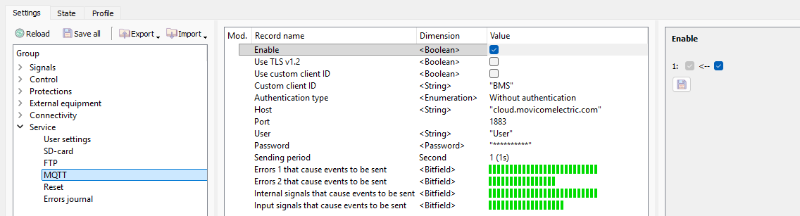
In this section:
- Enable – a flag to enable periodic sending messages to a remote MQTT broker;
- Use TLS v1.2 – a flag to enable TLS encryption while sending messages;
- Use custom client ID – a flag to enable user defined MQTT client ID. By default is defined as "main_5_SN", where SN – device serial number;
- Custom client ID – a user defined client ID;
- Authentication type – a type of TLS authentication:
- Without authentication;
- Server authentication (CA certificate must be uploaded to BMS);
- Client + server authentication (CA certificate, client certificate and private key must be uploaded to BMS);
- Host – MQTT broker IP address or DNS name;
- Port – MQTT broker port;
- User;
- Password;
- Sending period – message sending period, s;
- QoS – MQTT quality of service level;
- Errors 1, 2 that cause events to be sent – bitfields with errors which will be sent to the server, see Errors;
- Internal signals that cause events to be sent – bitfields with internal signals which will be sent to the server, see Internal signals;
- Input signals that cause events to be sent – bitfields with input signals which will be sent to the server, see Input signals;
Reset
The BMS Main 3X / BMS Main 2RX device can automatically restart after joining battery modules for charging. The restart will occur no more often than "Maximum number of resets" per day and no more often than once per hour.
To access settings of periodic device reset, select the "Service → Reset" section:

In this section:
- Enable – a flag to enable periodic device resets;
- Maximum number of resets;
- Days to reset the device – a bitfield to choose days for reset;
- Actual number of resets – a number of successful resets;
- Last reset timestamp – time of last device reset.
Errors journal
The BMS Main 3X / BMS Main 2RX device maintains a 32-entry errors journal. Each journal entry stores an error occurrence/disappearance timestamp and error flags.
The errors journal can be viewed in the "Service - Errors journal" section:
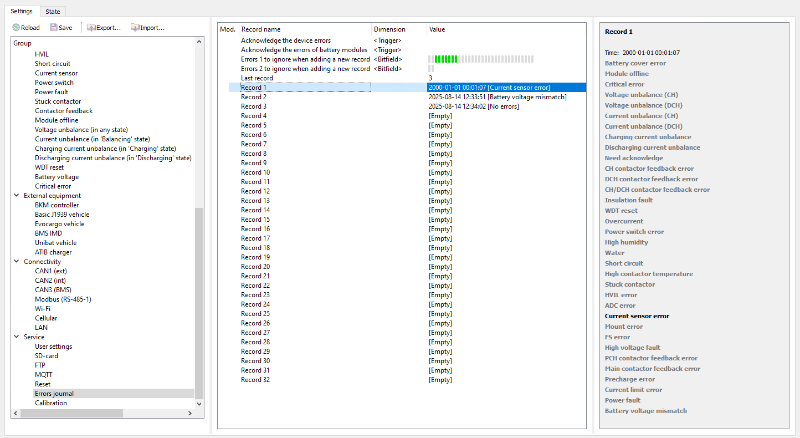
In this section:
- Acknowledge the device errors – a trigger to acknowledge the errors and clear the "Need acknowledge" signal on BMS Main 3X / BMS Main 2RX device;
- Acknowledge the errors of battery modules – a trigger to acknowledge the errors and clear the "Need acknowledge" signal on battery modules;
- Errors 1, 2 to ignore when adding a new record – bitfields with errors to be ignored while write to error journal;
- Last record – a number of the last entry in the errors journal;
- Record 1 … Record 32 – entries in the errors journal.
The errors journal is circular: after all 32 positions are filled, the next entry will be placed at position 1.