

3.6 Connectivity
Configuration
Connectivity
External CAN
The external CAN bus is used to configure the device and communicate with external devices (vehicle controller, inverter, display panel, etc.).
Also external CAN can be used as entry point to update child BMS Main 3 / BMS Main 2R controllers in battery modules.
To change the parameters of the external CAN bus, select the "Connectivity → CAN1 (ext)" section for BMS Main 3X and "Connectivity → CAN2 (ext)" section for BMS Main 2RX:

In this section:
- Enable – a flag to enable the CAN bus transceiver;
- Bus speed, kbit/s – CAN bus baud rate;
- 125;
- 250;
- 500;
- 1000.
Internal CAN
The internal CAN bus is used to configure the device and communicate with the BMS Indication, BMS Display indication and other internal devices.
BMS Main 2RX also uses internal CAN to connect to battery modules.
To change the parameters of the internal CAN bus, select the "Connectivity → CAN2 (int)" section for BMS Main 3X and "Connectivity → CAN1 (int)" section for BMS Main 2RX:

In this section:
- Enable – a flag to enable the CAN bus transceiver;
- Node ID – an identifier of the device in the CANopen network;
- Bus speed, kbit/s – CAN bus baud rate;
- 125;
- 250;
- 500;
- 1000;
- Send TPDO messages – a flag to enable sending TPDO messages on each Sync message;
- Send Sync messages – a flag to enabled sending Sync messages (CANID = 0x80, no data);
- Sync period – a period of sending Sync messages, millisecond;
- Send Heartbeat messages – a flag to enable sending Heartbeat messages;
- Heartbeat period – a period of sending Heartbeat messages, millisecond;
- Ignore NMT messages – a flag to ignore NMT messages;
- Ignore SDO messages – a flag to forbid communication using the CANopen SDO protocol;
- CLI: Master ID – message ID for transmitting CLI-commands to the device;
- CLI: Slave ID - message ID for receiving CLI-answers from the device.
CAN3 (BMS)
BMS Main 3X uses CAN3 bus to connect to battery modules.
To change the parameters of the CAN3 (BMS) bus, intended to communicate with battery modules with BMS Main 3 onboard, select the "Connectivity → CAN3 (BMS)" section:

In this section:
- Enable – a flag to enable the CAN bus transceiver;
- Bus speed, kbit/s – CAN bus baud rate;
- 125;
- 250;
- 500;
- 1000.
Modbus (RS-485-1)
The BMS Main 3X / BMS Main 2RX device supports the Modbus RTU protocol over the RS-485 bus. Modbus TCP is also supported when BMS Lanmodule installed on the board.
To change the parameters for connecting to the RS-485 bus, select the “Connectivity → Modbus (RS-485-1)” section:

In this section:
- Enable – a flag to enable the RS-485 transceiver;
- Address – a network address of the device;
- Baud rate – RS-485 bus baud rate.
Wi-Fi
The BMS Main 3X / BMS Main 2RX device can connect to a Wi-Fi network if the BMS Wi-Fi communication module is installed on the device.
To change the settings for connecting to a Wi-Fi network, select the "Connectivity →
Wi-Fi" section:

In this section:
- Enable – a flag to enable connection to a Wi-Fi network;
- Module – version of BMS Wi-Fi module:
- V1 (CC3100MOD);
- V2 (ESP32-C3);
- SSID – a name of the Wi-Fi network;
- Password – a password to connect to the Wi-Fi network;
- Security type – a secure connection type.
Cellular
The BMS Main 3X / BMS Main 2RX device can connect to a cellular network if the BMS GSM communication module is installed on the device.
To change the settings for connecting to a cellular network, select the "Connectivity → Cellular" section:
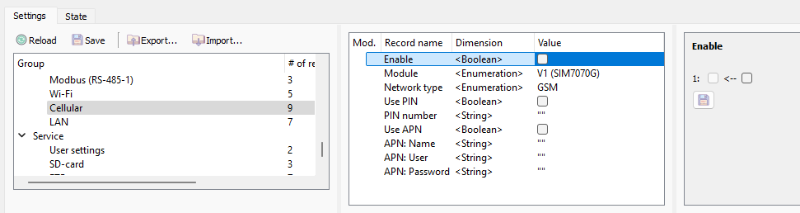
In this section:
- Enable – a flag to enable connection to a cellular network;
- Module – version of BMS GSM module:
- V1 (SIM7070G);
- V2 (SIM7600);
- Network type:
- GSM;
- LTE CAT-M1;
- LTE NB-IoT;
- Use APN – a flag to enable APN;
- APN: Name;
- APN: User;
- APN: Password;
- Use PIN – a flag to enable the PIN code;
- PIN number;
LAN
The BMS Main 3X / BMS Main 2RX device can connect to a local area network if the BMS LANmodule communication module is installed on the device.
To change the settings for connecting to LAN, select the "Connectivity → LAN" section:

In this section:
- Enable – a flag to enable connection to a local network;
- Module – version of BMS LANmodule:
- V1 (W5500);
- MAC – a MAC address of LANmodule;
- IP mode – a type of IP address:
- Static – IP address is configured manually;
- Dynamic – IP address is received from DHCP server;
- IP address – IP address (in static IP mode);
- Netmask – subnet mask (in static IP mode);
- Gateway address – address of a gateway (in static IP mode).