

1. Technical specifications
Technical specifications
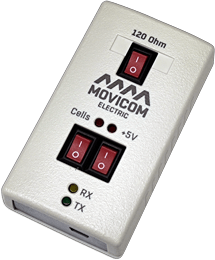
BMS USB-RS485 interface adapter provides conversion of USB bus signals to RS-485 bus signals. After connection to a PC device is recognized as a virtual COM port.
Adapter includes a switch to connect a 120 Ohm terminal resistor to RS-485 lines.
Device is compatible with the following operating systems: Windows 98, Windows ME, Windows 2000, Windows XP, Windows Vista, Windows 7, Windows 8/8.1, Windows 10, Mac OS 8/9, Mac OS X, Linux 2.4 and above.
The BMS USB-RS485 interface adapter performs the following functions:
- conversion of USB interface signals to a two-wire trunk RS-485 interface signals with galvanic isolation (Vrms = 1000V);
- power supply and information exchange with BMS Logic devices using the ElectricDeviceMonitor software.
Specifications
| Parameter | Value |
| Supply voltage, V | 5 (USB port) |
| Current consumption without external load, mA (max) | 80 |
| Output voltage, V | 5.0 ± 0.5 |
| Maximum output current, mA | 400 |
| RS-485 bus speed, bit/s | 600, 1200, 2400, 4800, 9600, 19200, 38400, 57600, 115200 |
| RS-485 bus speed for communication with BMS Logic, bit/s | 115200 |
| Dimensions (length × width × height), mm | 91 × 50 × 27 |
| Weight, g | 70 ± 10 |
| Operating conditions | |
| Operating temperature range, ° С | -40 to +85 |
| Degree of protection from external influences | IP20 |
Connection diagrams
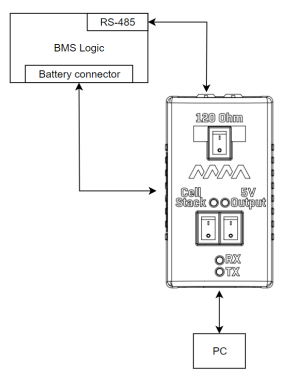
Figure below shows a diagram of connecting a BMS Logic device to a PC using the BMS USB-RS485.
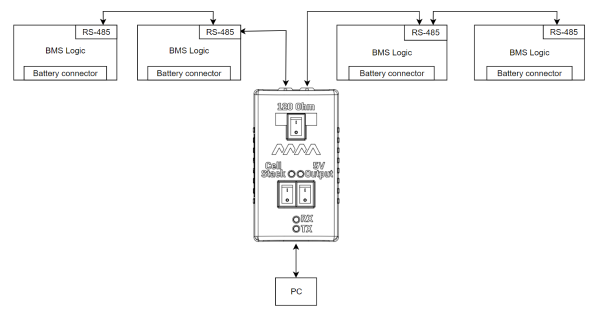
Next figure shows an option to connect the BMS USB-RS485 to the RS-485 bus, which already integrates several devices. If the BMS USB-RS485 is the last device on the bus, the 120 Ohm switch must be set to position "1".
Safety regulations
The BMS USB-CAN device can be connected to devices with a high voltage level that is dangerous to life and health. When working with high voltage devices, follow the rules of electrical safety: use safety goggles, protective clothing, insulated tools, and devices.