

3.1 General information
Configuration
General information
Configuration can be done using the web interface available via Ethernet or Wi-Fi.
Default connection settings for Ethernet are:
- IP address – 192.168.0.100
- Network Mask – 255.255.0.0
- Default gateway – 192.168.0.1
To connect via Wi-Fi use the IP address which an access point gave to the board (see Wi-Fi for configuring the connection and the “System → Overview” section to find out the IP address).
Default credentials for changing board settings using the web interface are:
- Login – user
- Password – bms
To access the web interface, enter the IP address of the board (192.168.0.100 by default) in the address bar of the browser.
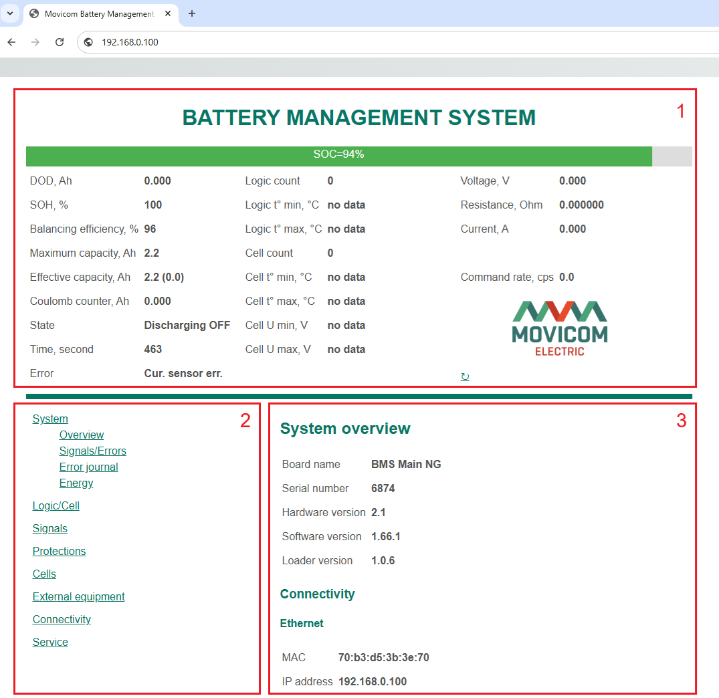
BMS Main 2.1 Web interface
At the top of the page there is a Overview section (1) in which the main parameters of the BMS system are displayed.
In the lower part of the page there is a block that serves to configure the board and read detailed information about the battery and BMS.
On the left from this block there is a Menu (2) for selecting sections, on the right side – a Settings section (3) with controls specific to the selected section.
Overview section shows the following parameters:
- SOC – State of Charge, %;
- DOD – Depth of Discharge, А×h;
- SOH – State Of Health, %;
- Balancing efficiency, %;
- Maximum capacity, А×h;
- Effective capacity, А×h (in brackets, the instantaneous value of the effective capacity used to calculate the SOC);
- Coulomb counter – charge received by the battery from the charger (sign “+”), or charge transferred to the battery load (sign “-“), А×h;
- State:
- Discharging ON;
- Discharging OFF;
- Relaxed (after discharging) – battery in a state of relaxation after discharging;
- Charing ON;
- Charging OFF;
- Relaxed (after charging) – battery in a state of relaxation after charging;
- Time – time in the current state, с;
- Error (see Errors);
- Logic count – the number of connected BMS Logic boards;
- Logic t°C min – the minimum temperature of the BMS Logic board, °C;
- Logic t°C max – the maximum temperature of the BMS Logic board, °C;
- Cell count – number of connected cells;
- Cell t°C min – minimum cell temperature, °C;
- Cell t°C max – maximum cell temperature, °C;
- Cell U min – minimum cell voltage, V;
- Cell U max – maximum cell voltage, V;
- Voltage – battery voltage, V;
- Resistance – battery resistance, Ohm;
- Current – current flowing through the battery, А;
- Command rate – exchange rate with BMS Logic boards, commands per second.